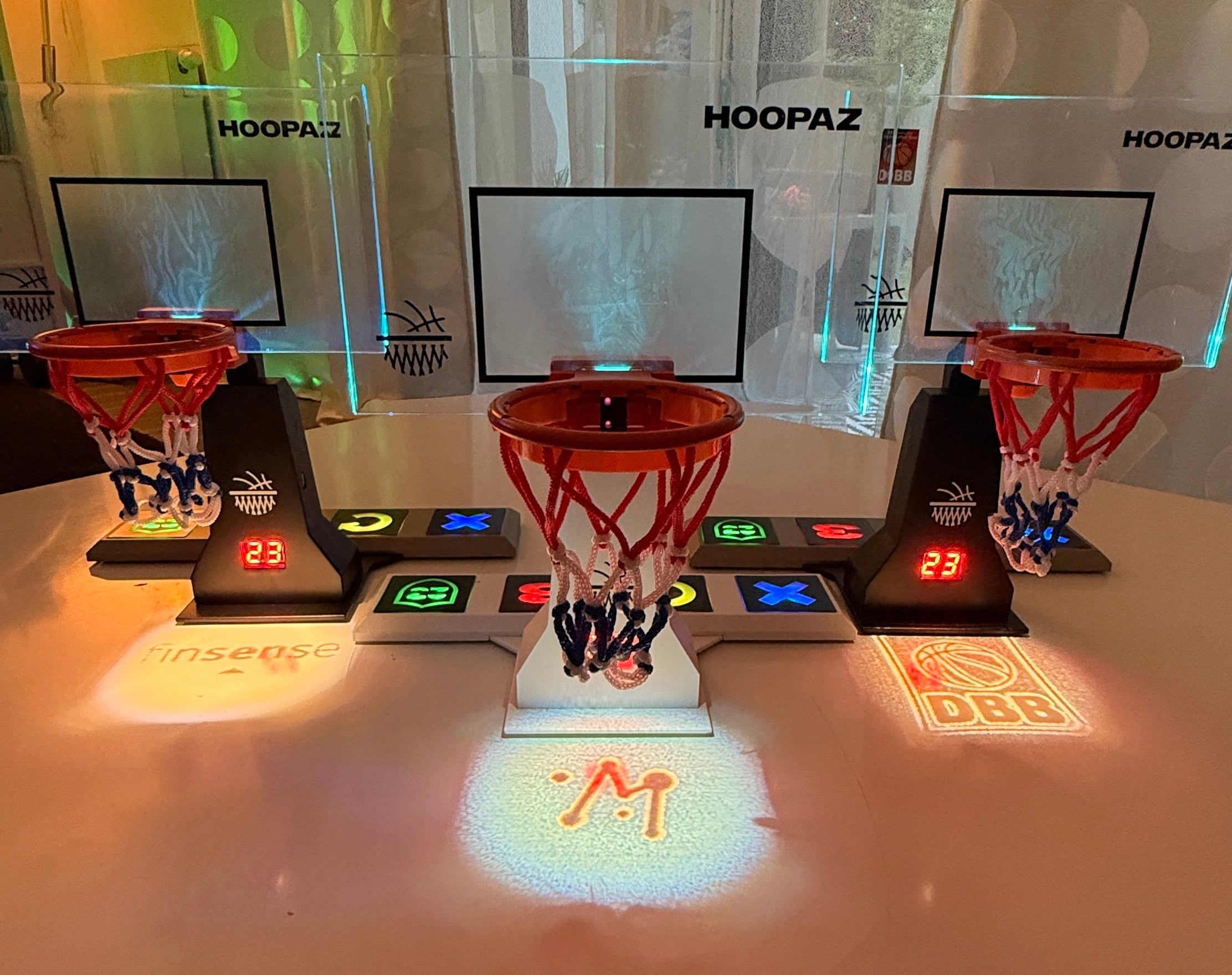
Your HoopaZ System
More than a game – an experience
The core of your system is the Defense Mode Button (green shield).
It controls the most important game functions. Together with the soft-touch buttons and the LED display, it creates an intuitive gaming experience that combines professional basketball elements with state-of-the-art technology.
Download the HoopaZ Hoop User Manual (PDF).
Download the Setup & Game Guide (PDF).
Quick Start
How to start your game
- Turn on your HoopaZ system using the switch on the back.
- The buttons light up, signaling the start.
- The Shot Clock counts up and greets you with "Hi".
- Your backboard displays all available game modes.
- Select your desired game mode and start your game.
Stand-Alone Mode
Do you want to play without an app?
- Hold the Defense Mode Button for 5 seconds.
- The backboard lights up white and blue.
- The Shot Clock jumps to 00.
- The game can begin.
To exit Stand-Alone Mode, press and hold the Defense Button again for 5 seconds.
Game Principle
HoopaZ is suitable for beginners and professionals.
Set a goal before the game starts, e.g.
- 6 points
- 12 points
- 24 points
- 31 points
A regular shot counts 2 points.
The game is played according to the popular Make it – Take it principle.
Further game rules can be found at:
hoopaz.com → HOOPAZ – The Game
Function Buttons
3-Point Button
Activates 3-point mode.
- Shot Clock starts for 23 seconds.
- Backboard lights up red.
- The shot is taken from approx. one meter distance.
- Hit = 3 points
If the player misses the shot, the opponent can reset the mode and continue playing.
Foul Button
Activates the foul procedure.
If a point is scored under foul conditions, it can be deleted using the retry button. The foul remains stored.
Retry Button
Short button press
- delete last point
Press and hold for 5 seconds
- reset entire score
- start new game
Defense Button
Defense Mode can be used up to three times per game.
The opponent must take a 3-point shot within 23 seconds.
- green backboard
- active countdown
- tactical game element
Design & Decor Mode
HoopaZ also makes an impression outside of the game.
In decor mode, the LEDs slowly change between the different game colors, transforming your system into a modern basketball light – perfect for living rooms, gaming rooms, or offices.
The HoopaZ App
With the HoopaZ – The Game App, you control your system completely digitally.
Functions:
- Bluetooth connection
- exclusive game modes
- Online matches
- Multiplayer worldwide
- Game statistics
- global HoopaZ community
More information:
hoopaz.com/app
Mounting the Side Nets
The side nets can be mounted in a few simple steps.
- Hook the net into the honeycomb holes of the bracket using the small hooks.
- Stretch slightly.
- Done.
The nets prevent balls from going out of bounds at the sides.
As you gain more game experience, they can be easily removed.
Battery & Charging
Battery life
| Mode | Runtime |
|---|---|
| Design Mode | up to 7 hours |
| Stand-Alone | up to 6 hours |
| App Training | up to 4 hours |
| Online Mode | up to 4 hours |
Battery low?
If "LO" appears on the display and the buttons flash, the system should be charged.
During charging, the LEDs indicate the current charge status.
If a game is interrupted by a low battery, HoopaZ automatically saves the current score and resumes it after being turned on.
Care Instructions
HoopaZ consists of high-quality electronics and precise sensor technology.
Please note:
- avoid strong impacts
- keep sensors clean
- do not stress plug connections under tension
- avoid direct sunlight as much as possible, as strong daylight can affect the infrared sensors
With proper use, your HoopaZ system will provide you with long-lasting enjoyment.
Thank you!
With HoopaZ, you're not just buying a game.
You become part of a global basketball community and support our vision to make basketball an experience in a whole new way.
Thank you for your trust.
We wish you many exciting games, unforgettable duels, and lots of basketball moments.
It's HoopaZ Time!
Your Rexhausen Family
#TeamHoopaZ